
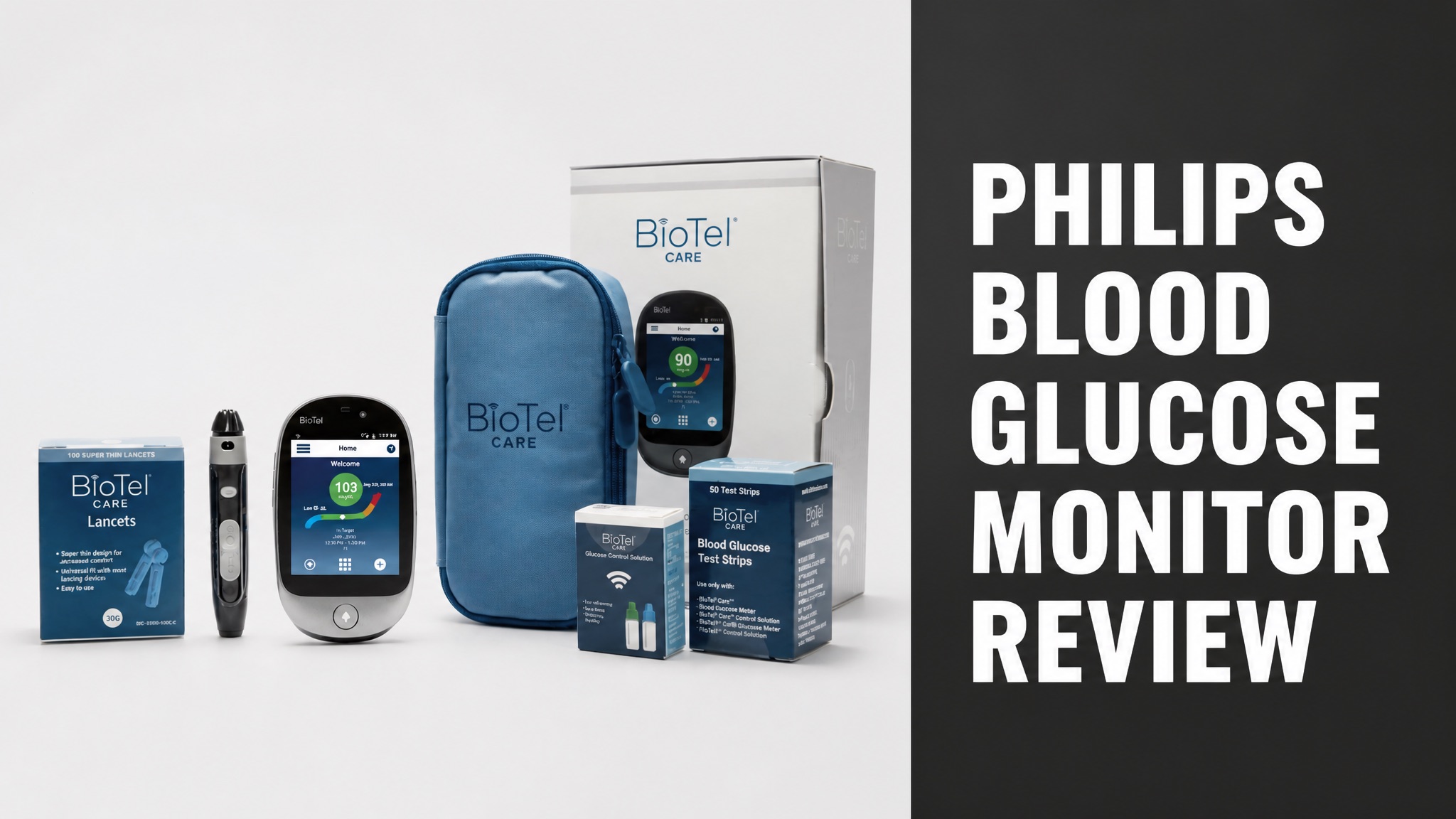
The Philips blood glucose monitor is a connected fingerstick meter sold under the BioTel Care name. Philips calls it the first FDA-cleared, cellular-enabled glucose monitor. It sends readings to an online platform automatically.
Philips Ambulatory Monitoring and Diagnostics runs the product. Insurers and clinical programs use it for remote patient monitoring. Retail buyers can also order the kit online. So does it suit a home user? Let’s break that down.
This review covers features, setup, reviews, safety, cost and alternatives. The sources describe a connected meter built for care programs. Here’s what that means for you before you spend money on strips and a kit.
What Is the Philips Blood Glucose Monitor?
The Philips blood glucose monitor is a connected fingerstick meter sold under the BioTel Care name by Philips Ambulatory Monitoring and Diagnostics. Philips calls it the first FDA-cleared, cellular-enabled blood glucose monitor. Readings travel to a secure online platform without any Bluetooth or Wi-Fi setup.
Philips BioTel Care also sells a connected blood pressure monitor and a connected weight scale. The glucose meter is one piece of a remote monitoring line built for people living with chronic conditions.
Who Makes the Philips Blood Glucose Monitor?
Philips makes the meter through its BioTel Care business, a remote patient monitoring unit. The company describes itself as an industry leader in population health management. In fact, the meter is a care-program tool first and a retail gadget second.
Philips also tied glucose data into its HealthSuite platform years ago. A diginomica report described a prototype diabetes app built with Radboud university medical center. That app used readings from wireless glucose meters.
How Does the Philips Blood Glucose Monitor Work?
The meter reads blood from a fingerstick test strip and sends the result over a built-in cellular connection. Philips says the data reaches its secure online platform in near real time. No phone pairing is needed. The good news? Setup stays simple.
The touchscreen shows trends and graphs right on the device. Philips states that no mobile app is required. To put it simply, the meter works like a regular glucometer with a cellular radio added.
Test steps:
- Wash and dry your hands before testing.
- Load a lancet into the lancing pen and insert a test strip into the meter.
- Prick your fingertip and touch the blood drop to the strip.
- Read the result on the screen and let the meter transmit it.
Philips offers a patient education video and a guide in English and Spanish. Check them before the first test. Does that matter? Yes, because correct strip handling affects every reading.
What Features Does the Philips Blood Glucose Monitor Have?
The monitor combines a color touchscreen, cellular data transfer and on-device trend graphs in one meter. Philips lists near real-time transmission, accurate and reliable readings, and no required mobile app. Insurers and research studies also use it.
The retail kit shown in Philips marketing images holds more than the meter. Here’s what the box contents include.
Kit contents:
- Connected glucose meter with touchscreen
- Lancing pen with super thin 30G lancets
- Blood glucose test strips
- Glucose control solution
- Blue zippered carrying case
Does the Philips Blood Glucose Monitor Need Wi-Fi or Bluetooth?
No. The monitor uses a cellular connection, so Wi-Fi and Bluetooth are not required. Philips says this removes the pairing hassle. You test, and the platform receives the result. That’s the main selling point.
Caregivers and clinicians view the data through the Telserve portal. The sources do not list a consumer smartphone app. So who sees your numbers? The care team does, along with you.
What Do Philips Blood Glucose Monitor Reviews Say?
Public reviews of this exact meter are scarce, and no major retailer page in the research carries a rating for it. Search results show a Philips product page, a media library entry and a few resale listings. Here’s the thing: little user feedback exists to quote.
Searchers do ask whether the Philips monitor is good quality. The honest answer is that Philips documents features but publishes no accuracy figures on its product page. Treat any star rating you find with caution.
What Do Users Like About the Philips Blood Glucose Monitor?
Philips highlights near real-time transmission and a no-app design as the strengths users value. Those claims come from the maker, not from reviews. The connected design also suits people whose doctors want remote data.
The kit adds a lancing pen, control solution and carrying case. In fact, that bundle covers the basics for a first month of testing. Extra strips and lancets still cost more.
What Are the Common Complaints About the Philips Blood Glucose Monitor?
The main gap is the lack of published accuracy data and independent user ratings. The pricing page also sits behind a buy online flow. Resale listings add another worry. Why? Expiry dates and third-party sellers affect strip quality.
One eBay listing offered 100 strips with an expiration of 11/2026. Pay attention to this: expired strips give unreliable results, so always check the date.
Is the Philips Blood Glucose Monitor Accurate?
Philips describes the monitor as accurate and reliable, but the product page gives no error percentage. The company holds an FDA clearance, which the page notes does not imply approval. Short answer: the claim is unverified by the sources.
Check the meter against a lab result at your next doctor visit. Run control solution tests too. The kit includes that solution for exactly this purpose.
Is the Philips Blood Glucose Monitor Safe and FDA Approved?
Yes. The monitor holds an FDA clearance, which Philips says does not imply FDA approval. Clearance means the agency reviewed the device for market entry. Bottom line: it is a legitimate medical device from a known maker.
Fingerstick testing carries small risks. Use a fresh lancet each time and clean the site. Talk to a doctor before changing insulin or medication based on any home reading.
Who Should Avoid the Philips Blood Glucose Monitor?
People who want a continuous sensor with alarms should skip this meter because it needs fingersticks. Anyone without cellular coverage may also see delays. To be clear, the meter suits spot checks, not constant tracking.
Needle-averse users may prefer a continuous monitor. Does that settle it? Not fully, since many continuous systems cost more and need a prescription.
How Much Does the Philips Blood Glucose Monitor Cost?
The research found no official retail price, only third-party listings that show what strips cost. One eBay seller sold 100 Philips test strips for $44.98 (USD) plus $21.46 shipping. Philips directs buyers to its Buy Online page for current kit pricing.
Here’s the part most people miss: connected meters are often supplied through insurers or care programs. Ask your plan first. That could cut the cost to near zero.
Reported pricing:
| Item | Price (USD) | Source |
|---|---|---|
| 100 test strips | $44.98 | eBay listing |
| Strip shipping | $21.46 | eBay listing |
| Full kit | Not listed | Philips Buy Online page |
Is the Philips Blood Glucose Monitor Worth the Price?
It is worth it for people whose doctor or insurer wants remote glucose data. For simple home checks, a basic meter costs less. And it gets better for care programs, because automatic transmission saves manual logging.
Strip cost drives long-term spending. At $44.98 per 100 strips, each strip costs about $0.45. Is that cheap? It depends on how often you test.
Where to Buy the Philips Blood Glucose Monitor?
Buyers can order the meter through the Buy Online link on the Philips BioTel Care page. Resale sites such as eBay also list strips and sets. Use the maker page first because it avoids expiry and storage problems.
Philips lists customer support at 855.445.6605. Register the device on the same site after purchase. So what should you check before paying? Confirm strip expiry and return terms.
What Are the Alternatives to the Philips Blood Glucose Monitor?
Alternatives include standard meters, Bluetooth meters and continuous glucose monitors such as FreeStyle Libre. Each trades price against convenience. Now here’s the thing: the Philips meter stands out only for its cellular link.
Meter types compared:
| Type | Data transfer | Testing |
|---|---|---|
| Philips connected meter | Cellular | Fingerstick |
| Bluetooth meter | Phone app | Fingerstick |
| Standard meter | None | Fingerstick |
| Continuous monitor | Sensor to app | Wearable sensor |
Should You Buy the Philips Blood Glucose Monitor?
Buy it if your care team wants automatic remote readings and you value a no-app setup. Skip it if you want public accuracy data or low cost. The good news? A reputable maker stands behind it.
In plain English, the Philips blood glucose monitor is a solid connected meter with thin public reviews. Ask your doctor or insurer, then compare strip costs before you commit.