
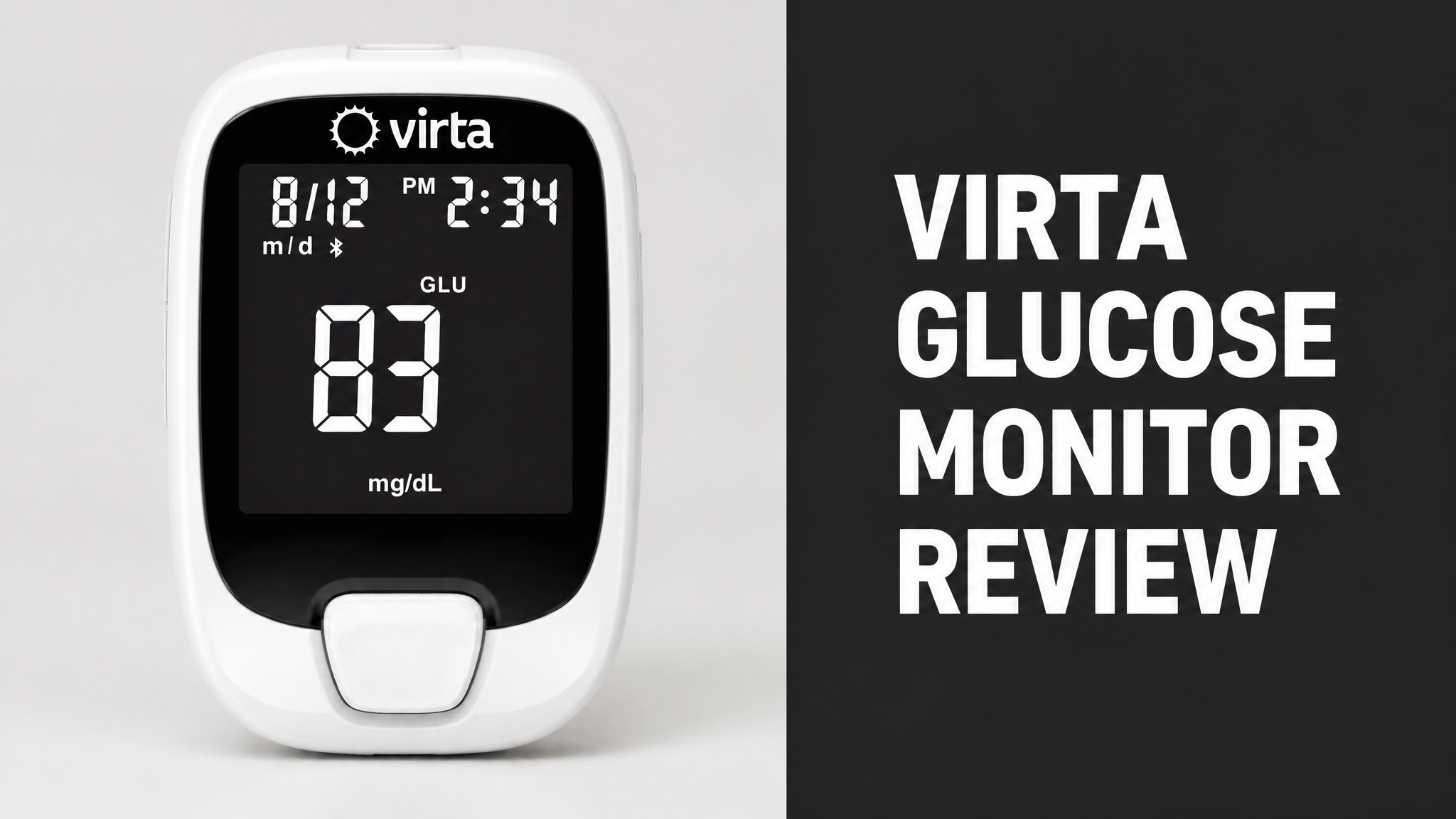
The Virta glucose monitor is a handheld meter that tests blood glucose and ketones from one fingerstick. Virta Health includes it in the starter kit for its diabetes and weight program. The meter syncs readings to the Virta app over Bluetooth, and the care team reviews them daily.
The kit also holds 100 lancets, combination test strips, and a cellular scale. Setup takes a few minutes. Error codes flag strip and sample problems. HI and LO results signal emergencies. Reviews praise smooth onboarding and clinical results. Critics dislike finger pricks and scripted coaching. Direct pricing runs $299 (USD) per month plus an initiation fee.
The program has strong clinical evidence, yet it demands regular blood testing and a strict low-carb plan. The sections below cover setup, risks, cost, and the Level2 comparison. Read on to learn what members report, which errors matter, and whether the program fits your daily life.
What Is the Virta Glucose Monitor?
The Virta glucose monitor is a handheld blood meter that tests glucose and ketones with one fingerstick. Virta Health ships it to members of its diabetes and weight program. The device is not a wearable sensor, so every reading needs a fresh drop of blood from a fingertip. Members test at home, then log each result in the app for the care team to review.
In plain English? The meter is a data tool for the care team. Daily readings upload to the Virta app. A physician and coach then review the numbers and adjust the plan. Is it sold alone? Virta’s support pages describe it only as part of the Starter Kit.
What Comes in the Virta Starter Kit?
The Virta Starter Kit bundles a glucose and ketone meter, 100 lancets, combination test strips, and a cellular body-weight scale. The box also carries control solutions, alcohol swabs, magnesium tablets, an electrolyte sample, and two getting-started booklets. Virta designs the contents to help each member and the care team personalize the plan. Kits vary.
Starter Kit Contents:
- Glucose and ketone meter with an information card
- Lancing device and 100 single-use lancets
- Combination box of glucose and ketone test strips
- Glucose and ketone control solutions
- Alcohol swabs
- Cellular body-weight scale
- Magnesium tablets and an LMNT electrolyte sample pack
- Recipe and quick-start booklets plus a tote bag
Here’s the catch with strips. They expire six months after the container is opened. Write the opening date on the side. Expired strips can produce inaccurate results, and that matters for medication decisions.
To be clear, the exact kit varies by enrollment. Contact Virta Support if something is missing. The scale uses a cellular connection, so it syncs to the app without Bluetooth pairing.
How Does the Virta Glucose Monitor Work?
The Virta glucose monitor reads blood from a test strip and sends the result to the Virta app over Bluetooth. The member pricks a fingertip with the lancing device and touches the strip to the blood drop. The meter beeps, counts down, and shows the result. The care team then sees the number in the app. Setup is quick, and the process repeats daily.
And here is the best part: the data drives real decisions. A physician supervises medication changes, especially insulin tapering, as glucose improves. The diet is strict low-carb, usually under 30 grams (about 1 ounce) of net carbs daily. Sounds demanding? It is.
How Do You Pair the Meter With the App?
Pairing takes one pass through the Virta app with Bluetooth turned on. The meter must sit near the phone or tablet during the process. After that single setup, glucose and ketone readings sync whenever the meter is on and the Virta app is open. The app shows a confirmation when pairing finishes. Pairing is needed only once for each meter you own and use.
Pairing Steps:
- Turn on Bluetooth and allow the Virta app to use it.
- Tap Pair meter on the Home screen, or open Devices & Settings.
- Wait while the app searches for the meter.
- Compare the serial number in the app with the one on the back of the meter.
- Confirm the serial number and wait for the pairing message.
Now watch this: the app searches for the meter for about 90 seconds after opening. Did a reading skip syncing? Tap Sync meter on the Home screen. Still stuck? Check Bluetooth permissions, then contact Virta Support.
How Do You Set the Date and Time?
The date and time live in the meter’s setup mode, reached with a long press of the power button. Make sure the meter is off and no strip is inserted. Hold the middle button for more than two seconds. Release it when the meter beeps. The screen then shows the clock-format setting. Clock accuracy matters because a wrong date or year can cause testing errors.
Pick 12-hour or 24-hour format with the left-side buttons. Press the main power button twice to save the choice. Why bother? Virta warns that a wrong date or year may cause errors when testing. Fix the clock first.
What Do Virta Glucose Monitor Reviews Say?
Virta reviews focus on the whole program more than on the meter itself. Few reviewers rate the hardware alone. Most comments cover coaching, the keto diet, and fingerstick testing. Judge the meter inside that wider context before deciding, because the device only works as part of the program. Read each review with that context in mind and note the post date.
Bottom line: feedback splits into two camps. Members praise results and structure. Others walk away over personalization. Threads on Reddit and Trustpilot hold more member stories, and recent posts show current experiences.
What Do Positive Virta Reviews Say?
Positive experiences center on smooth onboarding and strong clinical evidence. One reviewer called sign-up remarkably smooth. She answered a few questions in the app, booked a video assessment with a nurse, and received approval shortly after. The starter kit then arrived packed with toolswith a meter and scale. She felt well supported from day one.
The good news? The numbers back the praise. A 349-person trial reported an average A1C drop from 7.5% to 6.2% at one year. In fact, 94% of insulin users reduced or eliminated their insulin dose.
What Are the Common Complaints About Virta?
Common complaints target finger pricks, scripted coaching, and generic advice. One reviewer withdrew after the virtual assistant flagged her apple as a blood sugar risk and suggested an egg instead. She also found the care team’s answers script-driven, thin on science, and unable to address her questions. She then chose to leave the program entirely.
Reported Complaints:
- Regular finger pricks add daily friction
- The virtual assistant gave generic swap advice
- Care team answers felt scripted
- Supplements arrived without prior blood panels
Think of it this way: the reviewer wanted personalization and got a template. Do finger pricks really matter that much? For a busy user, yes. Multi-step blood testing adds stress to an already packed day.
How Does Virta Compare to Level2?
Virta and Level2 pursue the same remission goal with different tools and different access rules. Virta uses a fingerstick meter and a ketogenic diet. Level2 centers on a continuous glucose monitor and guidance built on American Diabetes Association (ADA) standards. Both assign a virtual care team to every member. Their methods differ in important ways.
Here is what that actually means: the choice comes down to tools and coverage. Let me break that down in a quick table.
Virta vs Level2:
| Feature | Virta | Level2 |
|---|---|---|
| Glucose tool | Fingerstick meter and strips | Continuous glucose monitor |
| Diet | Ketogenic, under 30 g net carbs | ADA-based, no rigid plan |
| Access | Direct, employer, or insurer | Select UnitedHealthcare plans |
| Evidence | Published randomized trial | 2023 conference poster |
| Direct price | $299 monthly plus $250 fee | Not sold directly |
So what does that mean for you? Shoppers without UnitedHealthcare coverage, UnitedHealthcare coverage cannot use Level2. A CGM gives richer data without finger pricks, though. That gap is Virta’s biggest hardware weakness.
Is Virta Backed by Clinical Evidence?
Yes. Virta has a published randomized trial of 349 adults with type 2 diabetes, followed for two years. The study appeared in Diabetes Therapy in 2018. Level2 offers only a conference poster and a pilot. Virta holds the deeper evidence base of the two programs. The trial followed members for two years. A Colorado pilot study also showed A1C reductions.
The results are specific. Average A1C fell 1.3 points. Some 60% of one-year completers reached an A1C below 6.5% without medications besides metformin. Average weight loss hit 12%. Prescriptions for diabetes drugs dropped 67% at two years.
Does the meter earn that credit alone? Not really. The trial tested the full program, so the meter is one input among many. Still, it feeds the data that powers the care team’s decisions.
What Are the Risks of the Virta Glucose Monitor?
The main risks come from missed error codes, expired strips, and ignored critical readings. Virta’s support pages stress one rule above all: do not delay medical care while troubleshooting the meter. Severe symptoms need emergency help first. Calling 911 or visiting an emergency department comes before any support ticket. Safety always comes first.
Worth knowing: strip quality drives accuracy. Strips expire six months after opening. Moisture, contamination, or damage can also spoil a result. Use a new strip for every repeat test.
What Do Virta Meter Error Codes Mean?
Error codes tell the member what went wrong with the strip, the sample, or the meter. Most fixes start the same way. Discard the strip, then repeat the test with a fresh one. Hardware errors E6 and E7 need a battery reset first. Contact Virta Support if the error returns after the restart. Each code points to one clear cause, so the display names the fix.
Common Error Codes:
| Code | Meaning | Fix |
|---|---|---|
| E1 | Used or contaminated strip | Use a new strip |
| E2 | Sample applied too early | Wait for the flashing blood-drop symbol |
| E3 | Incorrect strip | Use a Virta glucose or ketone strip |
| E5 | Temperature out of range | Move to 41-86°F (5-30°C) for 20 minutes |
| E10 | Insufficient sample | Fill the sample window completely |
| E11 | Low battery or poor connection | Install two new alkaline AAA batteries |
Here’s the thing about E11. The code can also signal rapid battery drain. Supplies in the carrying case may press the power button. Check that first, then confirm the date, time, and year.
What Do HI and LO Results Mean?
HI and LO results signal possible emergencies that need action right away. A glucose HI means a reading above 600 mg/dL (33.3 mmol/L). A ketone HI means a reading above 8.0 mmol/L. A glucose LO means a critically low reading below 20 mg/dL (1.1 mmol/L). Confirmed values can be a medical emergency. Act on the reading immediately and call for help if needed.
The bad news? A LO ketone reading below 0.1 mmol/L is not low blood glucose. Do not confuse the two. Treat a low glucose reading immediately, and do not wait to repeat the test.
For severe symptoms, call 911. Those include vomiting, confusion, rapid breathing, or extreme weakness. Also, if the ketone warning is on and glucose tops 300 mg/dL (16.6 mmol/L), the meter shows KETONES. Test ketones at once.
Who Should Talk to a Doctor First?
People who take insulin or sulfonylureas need a doctor’s input before enrolling in a program like Virta. Rapid medication reduction can cause hypoglycemia, which is dangerously low blood sugar. Kidney disease, heart failure, and past cardiovascular events also call for a physician conversation first. Call the doctor before you enroll and bring a list.
Pregnancy needs the same step. So does a history of eating disorders, because very low-carb plans require extra monitoring. Never stop insulin or change doses unless a qualified provider directs it.
How Much Does Virta Cost?
Virta’s direct-to-consumer price runs $299 (USD) per month plus a one-time $250 initiation fee. HealthyWayFit reported those figures, and Virta changes fees over time. Check virtahealth.com for current pricing before you commit to anything. The starter kit with the meter ships after enrollment. Prices may change over time, and plans affect the final cost.
Employers and insurers change the math. Coverage can lower the member cost, sometimes to zero. Virta also publishes a self-pay costs FAQ for members paying out of pocket. Ask your benefits team first.
Virta Cost Breakdown:
| Item | Amount | Notes |
|---|---|---|
| Monthly fee | $299 | Direct-to-consumer rate |
| Initiation fee | $250 | One-time charge |
| First-year total | $3,838 | 12 months plus the fee |
| Employer or insurer plan | Lower or zero | Depends on coverage |
Is the Virta Glucose Monitor Worth the Price?
Yes. The program pays off most when an employer or insurer covers the fee. The meter alone has no standalone price. Members pay for the whole package: physician, coach, app, scale, and starter kit. Coverage turns that package into a strong deal for most adults with type 2 diabetes. Employer plans often reduce the cost, sometimes to zero for the member.
Paying out of pocket is harder. The monthly fee adds up to $3,588 per year before the $250 initiation charge. Is that worth it? It can be, if the trial-level results hold for you.
Is the Virta Glucose Monitor Worth It?
Yes. The Virta glucose monitor is worth it for adults with type 2 diabetes who accept finger pricks and low-carb eating. The meter is functional and well supported by clear help pages and guides. The program behind it has the strongest published evidence in its category. Published evidence supports the program. One randomized trial covered 349 adults.
Best-Fit Checklist:
- Adult with type 2 diabetes
- Employer or insurer coverage, or budget for $299 monthly
- Comfort with daily finger pricks
- Willingness to eat under 30 g (about 1 oz) net carbs daily
To put it simply: match the tool to the person. The meter supports a physician-led plan. The device does not replace one.
Who Should Choose Something Else?
Members who dislike finger pricks, want a continuous sensor, or lack type 2 diabetes belong in a different program. Level2 suits UnitedHealthcare members who want a CGM. Virta also covers prediabetes and obesity management, but most published research focuses on type 2 diabetes. Other options exist for these members, so compare programs before enrolling.
Short answer: skip Virta if you want personalized coaching above all. Reviewers who left cited scripted support and generic advice. Weigh that against the trial results, then talk with your doctor before enrolling.